


Last week, we updated that the search engine giant Google has introduced a new feature in the Gmail and it is called Smart Compose. The company announced the feature at the Google I/O Developer Conference event. Well, now the company has rolled out the feature to the desktop and in this article, I will guide you the way you can activate the feature and the way you can use the feature to write your emails quickly and easily.


The smart compass feature is nothing but it is like the auto-complete in the search, which means the feature will suggest the best available phrases or words when you type in the Gmail.

How to get the feature
To get the Smart Compose feature, you need to enable the new revamped version of the Gmail, which the company rolled out a couple of weeks ago. If you haven’t enabled the new and cool version of Gmail, then you need to click the settings button, which is placed on the right side of the screen. And select the ‘Try the new Gmail’. That’s all, the new version of Gmail is in front of you.

Well, now go to the Setting by selecting the icon on the right side and select the Settings option. Now scroll down to the Experimental Access option, and click on the box to enable it, then scroll down and click “Save Changes”.
How to use the feature
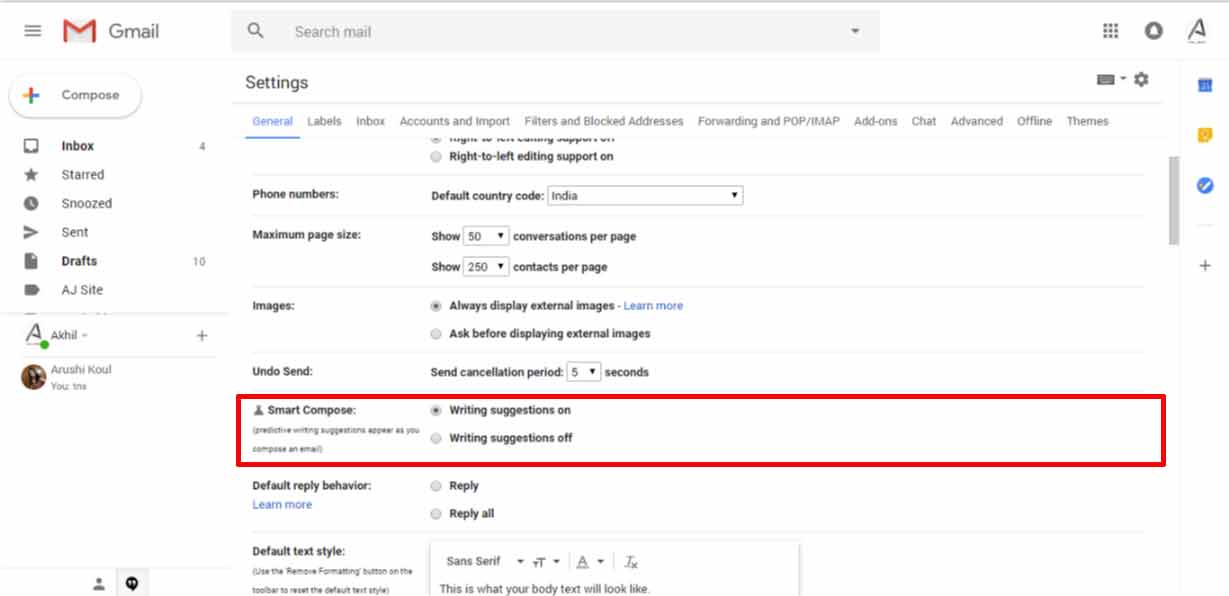
Now again to go to the Settings of the Gmail, and scroll down until you find the “Smart Compose”. And check the “Writing suggestions on” is enabled or not. That’s it, now you can able to type emails in Gmail with the Smart Compose feature. Now you just need to press the tab key to put the suggested words and continue typing.
Wrapping-up
Well, the feature is currently available only in English and I believe that the company will expand the language support in coming days. After using the feature, it seems that the Google’s new Smart Compose feature is learning the user’s writing nature because it is not suggesting the way it was in the demo at the event. However, the general things are working well, like the feature automatically suggests ‘Hi’ in the beginning and I hope that it will improve with the increase of the usage.

So, have you enable the new Smart Compose and what do you think about it??? Do let us know in the comments section below!

