

Google Maps is one of the very important applications in our daily life and it helps us to navigate across the cities and it is very useful especially if you are in a new town. I don’t believe that the Google Maps application needs a huge introduction. Now the developers of the Mountain View company Google have integrated Google Gemini 3 into Google Maps.

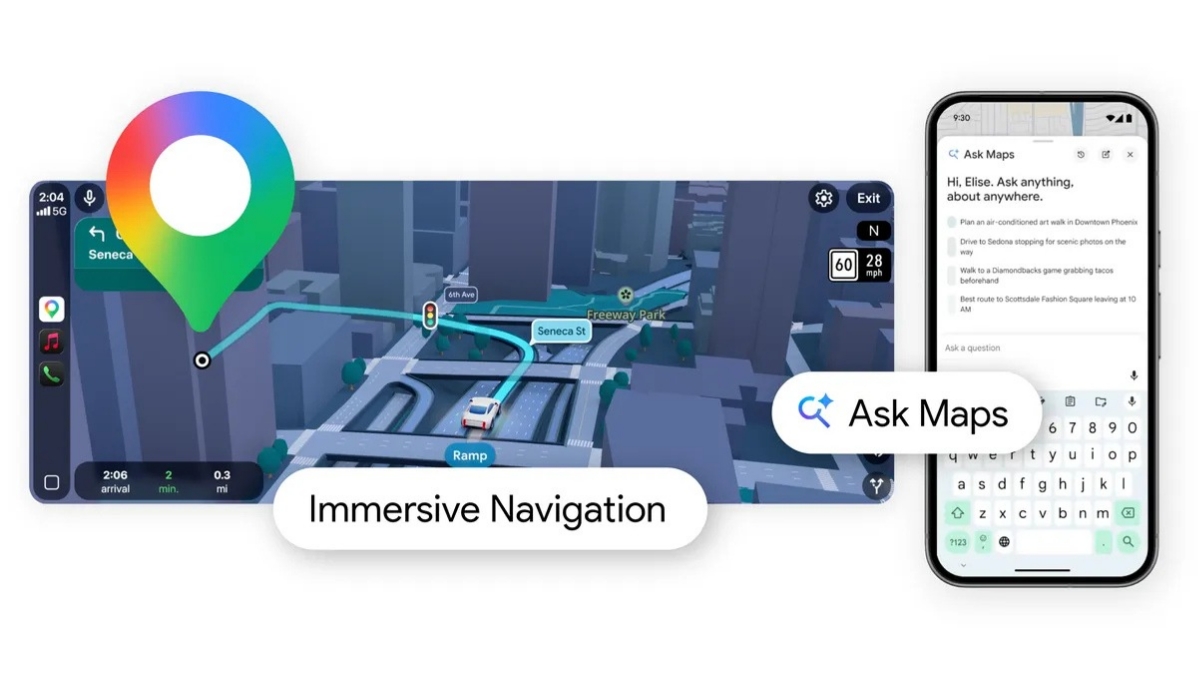
It is worth mentioning that Google introduced Gemini in Google Maps in last year to make navigation easy and also to provide a conversational driving experience. With the latest integration, Google has introduced 2 new features for Google Maps including Ask Maps and Immersive Navigation. So let’s dive into the article to check out both features in detail.
Ask Maps
This particular feature is a new conversational experience that answers complex, real-world questions a map could never answer before. You guys can simply ask questions to Google Maps regarding free charging spots or for a public cricket ground among others. You need to hit on the “Ask Maps” button and for answers conversationally, you are actually getting a customised map that will help you visualise your options.

For an instance, if you are planning a trip to the hill station, then the application will be offering complete directions, ETAs, and insider tips from real people, and it to create your itinerary, the Google Maps application analyses information over 300 million places, including reviews from Google’s community. You will be getting a personalised based on things like places you have searched for or saved in Maps. This particular feature is currently available in the United States and India for both Android and iOS. Google will be releasing the feature on desktop very soon.
Immersive Navigation
It is a complete transformation of the navigation experience with the newly designed visuals and more intuitive guidance. You will be getting a vivid 3D view that will be offering the buildings, overpasses, and terrain around you. Google Maps will be highlighting critical road details including lanes, crosswalks, traffic lights, and stop signs to help you make that turn without any issues.
Google Maps has also added some more features to make your driving experience easy including the ability to see more of your route that will enable you to get a broader view of your route. It will be offering smart zooms and transparent buildings that will help you look.
You will also get voice guidance in a more natural manner and Google Maps can now understand tradeoffs for alternate routes. You can also preview your destination and its surroundings with Street View Imagery, and the application will be offering recommendations for where to park. Google is offering these features across the United States and it will be available to eligible iOS and Android Devices, CarPlay, Android Auto and cars with Google built-in in the coming months.
So what are your thoughts about the new updated Google Maps? Share your thoughts in the comments section below and stick with us for more updates from the world of technology.
Read interesting news, reviews as well as tips & tricks on TechnoBugg website, and stay updated with the latest happenings of the tech world on the go with Technobugg App. Also follow on Google News and join our Telegram channel as well as WhatsApp Channel for the latest updates.


