

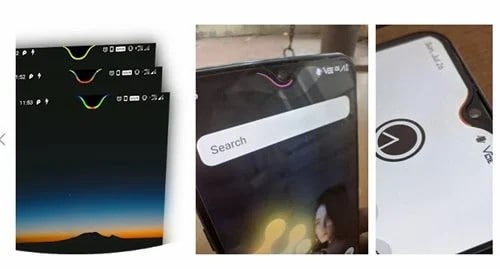
Notch is quite common nowadays on smartphones and it is basically to provide more screen area to give a cool viewing experience and the notch is meant to accommodate the camera and other sensors.

However, the notch received mixed opinions and if you like the notch design then you can double it with a battery indicator as well. In this article, we will introduce an application that will help you to enable the notch into a battery indicator and that means you will get an amazing way to keep your eye on the battery level of your device. So without making any further delay let’s dive into the article to check out the incredible application which will help you to turn your notch into a battery indicator.
How to turn notch into a battery indicator
To enable notch into a battery indicator, you need to download and install Energy Notch and the same is available on the Google Play Store. It is worth mentioning that the application is developed for the devices from the brands – OnePlus, Motorola, Xiaomi, and Realme smartphones.

The application also enables users to customize everything and that includes colours to size, you can change everything on the Energy Notch.
So check out the application and the double-up notch into a battery indicator and shine between your friends. We recommend you to stay tuned with us for more interesting information from the world of technology at your fingertips and don’t forget to smash the bell icon at the left corner of the screen to get the notifications instantly.

Read interesting news, reviews as well as tips & tricks on TechnoBugg website, and stay updated with the latest happenings of the tech world on the go with Technobugg App. Also follow on Google News and join our Telegram channel for the latest updates.

