


Microsoft has unwrapped the latest Operating System for billions of PCs and notebooks and has decided to call it Windows 11. The release follows multiple leaks, name teases and anticipation. It comes with major upgrades that include redesigned UI, support for Android apps, better widget support, system-wide dark theme support, redesigned Windows store and so on.

One key highlight is the support for Android apps which we will explore in detail below. The new OS from the company comes after six years of Windows 10. The new OS promises a significant performance boost, and the UI shares many elements with the cancelled Windows 10X. Let us explore the features and changes that one will get to experience in the new Operating System from Microsoft.
New Features in Windows 11


Kicking things off with the design, this time we get a new Start menu and an updated button which can be placed at the centre of the taskbar. the design team scraps the Live Tiles concept which was introduced in Windows 8 and now you get to see a similar layout to Chrome OS or Android. It borrows design cues from macOS in designing elements such as search or recent documents and the OS also gets rounded corners as seen in Android or iOS.

Windows 11 also gets a new dark and light mode which is a significant upgrade over its predecessor. The feature which lets you quickly snap apps into various modes is called Snap Layouts. Snap Groups feature will remember where current apps are stored and restore them quickly and this helps users who rely on multiple monitors at once.

The company claims that Windows 11 is 40% smaller in size and better optimised in handling background tasks. Now you get Microsoft Teams integrated onto Windows 11 and it will be placed on the taskbar, which signals a departure from Skype – the default video call app which was relied upon previously.

The Widgets are now powered by AI and get an upgrade as well. It can be now used on full screen and the inbuilt widgets include a news feed, weather, and maps. Previously users had to switch between tablet mode and desktop mode to use touch-enabled devices efficiently and now the OS is more adapted to touch interface.
It also gets updated in inking and voice typing with support for superior haptic feedback. It could also get stylus support and similar hardware. Microsoft has ported the Auto HDR feature previously seen in Xbox consoles which will boost HDR in DirectX 11 and DirectX 12 games. In addition, Windows 11 also gets DirectStorage, Game Pass, xCloud which were exclusive to the Xbox series.
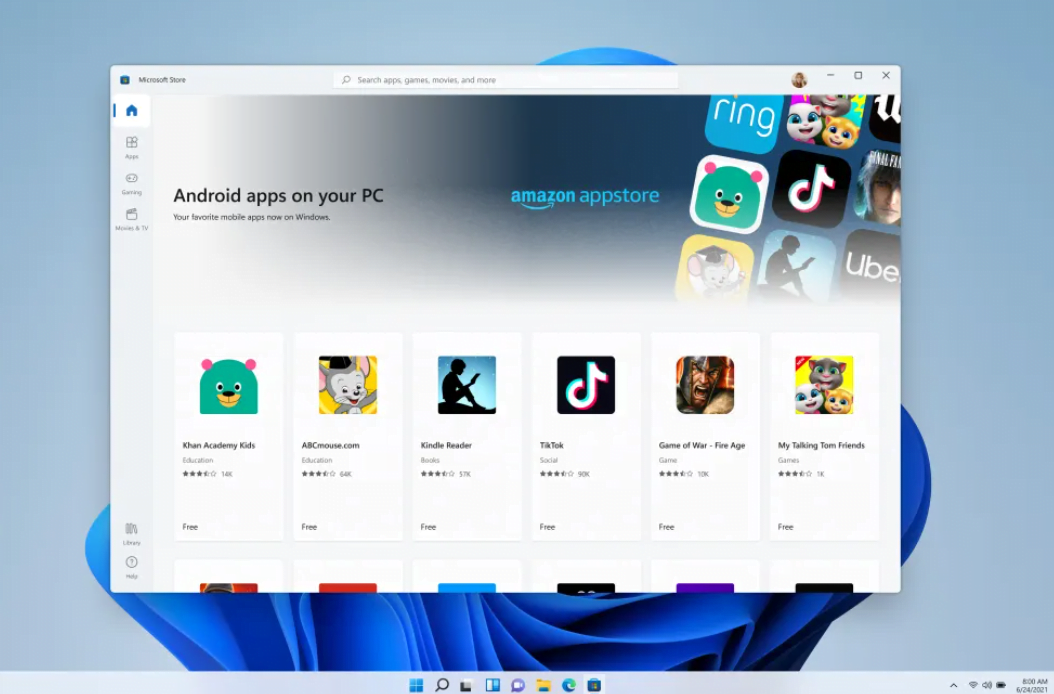
Probably the biggest update on Windows 11 is the support for Android apps. The latest OS brings a bag of apps that weren’t available before and the Microsoft Store gets a makeover too. Some of these apps available at launch include Instagram, TikTok, Adobe Creative Suite. Developers of these apps can use their own “commerce engines” or even use their own payments systems and Microsoft promised not to charge any fees, unlike Apple. Microsoft CEO Satya Nadella says, “Windows has always stood for sovereignty for creators.” Microsoft has also partnered with Amazon and Intel to help bring more Android apps into the mix.
Furthermore, the company revamps Entertainment tab in the store and that will provide movies and TV shows across all the popular streaming services. Windows 11 is also coming with the ability to wirelessly cast the content to your smart TV.
Microsoft has not revealed a release date for Windows 11 at the moment but has informed us that it will a free upgrade for genuine Windows 10 users. The update is promised by Q4 of this year alongside new hardware that hosts the Windows 11 OS.
Read interesting news, reviews as well as tips & tricks on TechnoBugg website, and stay updated with the latest happenings of the tech world on the go with Technobugg App. Also follow on Google News and join our Telegram channel for the latest updates.


278 Comments
Keep this going please, great job!
Wow, amazing blog format! How lengthy have you ever been blogging
for? you msde blogging look easy. The full look of our
web site is fantastic, as smartly as the content material!
My spouse and I stumbled over here different page and thought
I might check things out. I like what I see so now i am
following you. Look forward to checking out your web page for a second time.
Take a look at my website; cashofferplease
Hey! This pozt couldn’t be written any better! Readiing this post reminds me of my
goodd oold room mate! He always kept taoking about
this. I will forward this article to him. Pretty sure he will have a
good read. Thanks for sharing!
I’m really impressed with your writing skills and also with the format in your weblog.
Is this a paid subject matter or did you modify it your self?
Anyway stay up the nice quality writing, it is uncommon to peer a nice weblog like this one these days..
Heya! I just wanted to ask if you ever have any troublle with hackers?
My last blog (wordpress) was hacked and I ended up losing a few months
of hard work due to nno back up. Do you have aany solutions to prevent hackers?
Simply desire to say your aricle is as surprising.
Thhe clearness for your submit is simply excelent and that
i can assume youu are knoiwledgeable in this subject.
Well along with your permission let me to grasp your feed to stay updated with impending
post. Thanks 1,000,000 and please carry on the enjoyable work.
We’re a group of volunteers and starting a brand new scheme in our community.
Your site provided us with valuable info to work on. Youu have performedd an impressive job and our whole neighborhood will likely be grateful to
you.