

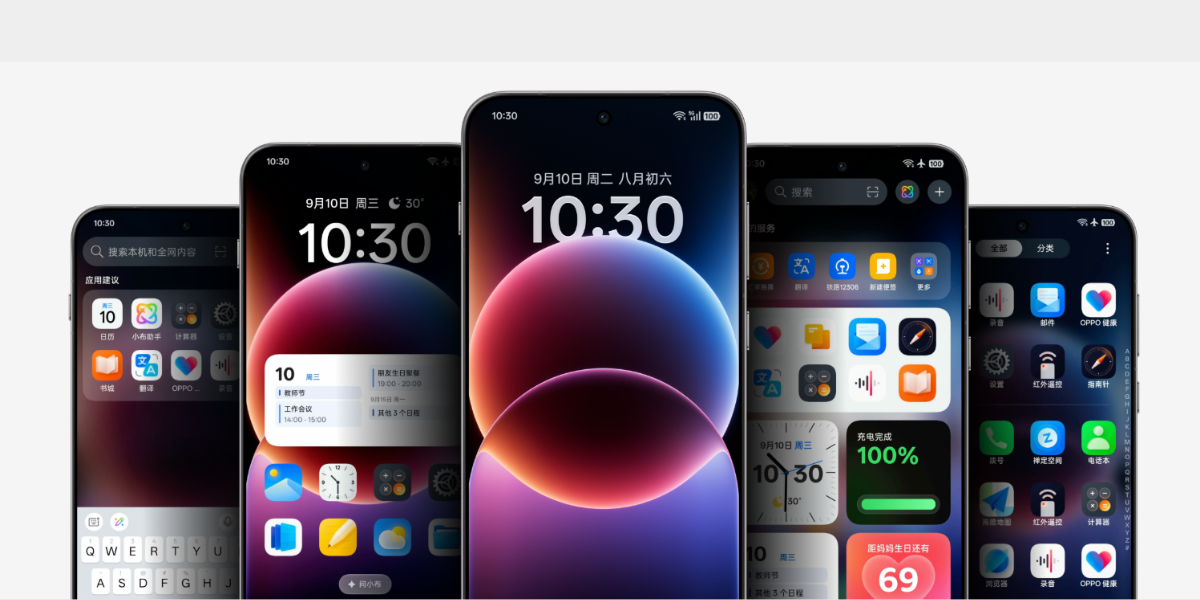
The popular Chinese smartphone brand Oppo has introduced its latest version of custom skin dubbed ColorOS 16 and it is based on the Android 16 operating system. The new version comes with visual upgrades throughout the system, extended customizations, and the new operating system also focuses on a smoother experience, better AI capability, and a robust ecosystem. So let’s get into the article to check out the complete details.

Everything about ColorOS 16
The latest ColorOS 16 is updated with visual enhancements and now it looks cleaner, smoother, and more transparent. The new Light Field Design language brings new translucent UI textures and elements and it is actually the Liquid Glass UI. Oppo has also implemented the Luminous Rendering Engine and that will offer a seamless parallel rendering motion, it will also offer smooth visual transitions, and the improved Trinity Engine.
Oppo says that the new ColorOS 16 achieves 37% higher stability at heavy load, 4.1 degrees temperature reduction, 13% better power efficiency, and a 14% reduction in CPU load. The latest operating system is also capable to offer 26% faster app launch, 30% faster in-app click response speed, and a 16% increase in boot speed.

The latest update brings enhancement to the lock screen and the same features new clock styles that can be placed anywhere on the screen. The new version of the operating system also features drop shadow effects and full-screen AOD support. It will also enable you to add widgets to the lock screen and the update also enhance the customisation options as well.
Oppo has introduced the ColorOS 16 with deep AI integration into core apps such as Notes, Recorder, and Calendar. The operating system also comes with the new AI Portrait Glow feature that optimizes skin tones and balances light with a single tap. The improved Aqua Dynamics feature and the same will be offering three live activities and supports Cloud Live Activities with more than 110 live services.
It also comes with improved connectivity and the company has updated O+ Connect and the same supports Windows PCs and Macs. Tablet users can now run up to five apps simultaneously using the new Screen Mirroring option.
Read interesting news, reviews as well as tips & tricks on TechnoBugg website, and stay updated with the latest happenings of the tech world on the go with Technobugg App. Also follow on Google News and join our Telegram channel as well as WhatsApp Channel for the latest updates.


