


If your Outlook status bar displays ‘Working Offline’ or ‘Disconnected’, it indicates that the Outlook isn’t connected to the mail server. Also, the Outlook icon on the taskbar is displayed with a ‘red cross mark’, indicating Outlook is offline.


Figure 1: Outlook Taskbar Icon indicating Outlook is Offline

When Outlook is offline, you can’t send or receive email until reconnected to the Outlook mail server.
However, you can write new emails, schedule meetings, add new tasks or notes, etc. while offline. These changes are synchronized with the mail server when the Outlook reconnects to the mail server.
In this post, we have discussed various reasons that may cause Outlook to go offline or disconnect from the mail server. Also, fixes to reconnect Outlook with the mail server and switch Outlook status from ‘Working Offline’ to ‘Connected.’
Why Outlook Went Offline or Disconnect?
Outlook may go offline due to three possible reasons,
- Internet or mail server connectivity issue
- Problem with the Outlook Account
- Accidentally enabling ‘Working Offline’ mode

Figure 2: Status Offline
Troubleshooting Methods to Fix Outlook’s ‘WORKING OFFLINE’ Status
Follow these troubleshooting steps to inspect the network connection and mail server,
- Check your internet connection and make sure your mail server isn’t blocked via the firewall. Ask your system administrator to allow access to the mail servers.
- If your Internet connection is working and the mail server isn’t blocked, there could be a problem with the mail server.
- To check the mail server, try log onto your email via Outlook for Web. Check if you can send and receive emails. If you can, then your mail server is working fine. If not, your PC might need updates or there could be a problem with your account or profile settings.
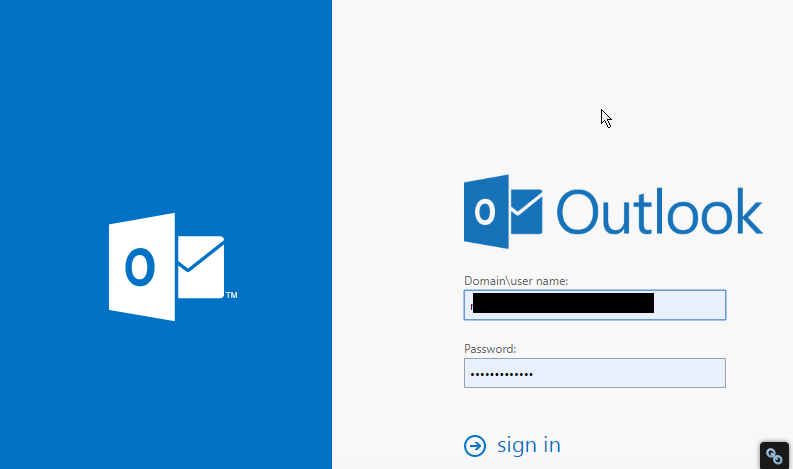
Figure 3: Outlook for Web
Follow these fixes to reconnect Outlook to mail Server:
Fix 1: Disable ‘Working Offline’
If you have accidentally switched Outlook to ‘Work Offline’ mode, follow these steps,
- Go to the ‘Send/Receive’ Tab
- If ‘Work Offline’ has a shaded background, click on it to disable

Figure 4: Work Offline Enabled

Figure 5: Work Offline Disabled
After a few seconds, the Outlook should reconnect to the mail server and you will see a change in the status bar at the bottom as ‘CONNECTED’ or ‘CONNECTED TO: [MAILSERVER NAME]’

Figure 6: Status Connected
Fix 2: Check and Install Updates
- On your Outlook, go to File>Office Account (or Account)
- Click on the ‘Update Options’ button and select ‘Update Now’ or ‘Apply Updates’
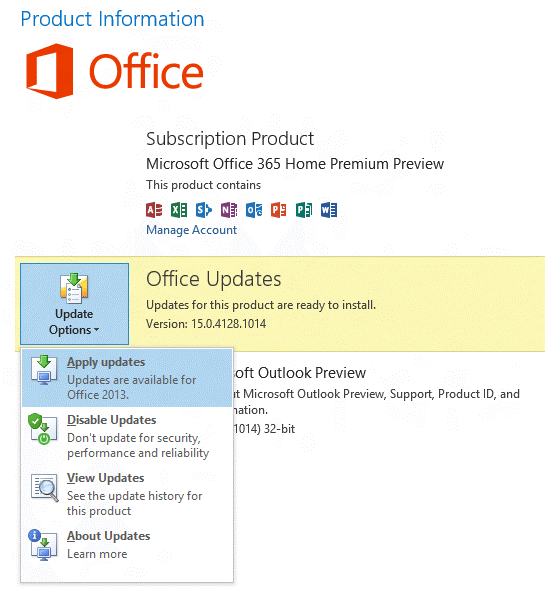
Figure 7: Update Options
If your organization is using ‘Group Policy’ to manage updates, the ‘Update Options’ button isn’t visible. Check and install the latest Windows updates to update the Outlook.

Figure 8: Update Options not available
Fix 3: Create a new profile
If your Outlook profile has a problem, the Outlook may disconnect from the server. In such a case, you can create a new Outlook profile and sign in.
- Click on File and then click ‘+Add Account’

Figure 9: Add new profile
- Then sign in using your email account
If sign-in fails with the new profile, try to reconnect your profile.
Fix 4: Reconnect Outlook Profile
Remove your mail account from the Outlook and try adding it back again. If this fails to reconnect the profile, your OST may have stopped sync from the mail server due to some error.
In such a case, you can export your Outlook mail items to an Outlook importable PST file via Outlook Import/Export wizard.
Alternatively, you may also use a third- party software such as Stellar Converter for OST to Convert OST to PST file format.
Later, you can reconfigure your Outlook profile and then import the converted PST mailbox items to your current Outlook profile.
Conclusion
If your Outlook profile is showing status as Offline or Disconnected, you should first check the ‘Send/Receive’ option and disable the ‘Work Offline’ mode. In case it’s already off, there could be a few reasons that could have led to the Outlook disconnection from the mail server.
You can follow this troubleshooting guide to check and apply various fixes that may help you reconnect your Outlook profile to the mail server. If not, export your Outlook mailbox to PST file format and then import the PST file to your new Outlook profile.
In the case of Outlook Import/Export wizard fails to export PST, you can use any reliable OST to PST converter tool as mentioned in the post. For more help, please leave your comments below.
Note:- To know the location of ScanPST.exe in different Outlook versions, read the helpful tutorial: https://www.stellarinfo.com/
Author bio

Eric Simson is an Email Platform Consultant and is associated with Stellar Data Recovery from last 6 years. He writes about the latest technology tips and provides custom solutions related to MS Outlook, MS Exchange Server, Office 365, and many other Email Clients & Servers.


2,367 Comments
Great items from you, man. I have keep in mind your stuff prior to and you’re simply too wonderful.
I actually like what you’ve acquired right here, really like what you are saying and the way wherein you assert it.
You make it enjoyable and you continue to take care
of to stay it smart. I cant wait to learn much more from you.
That is actually a great site.
Hello there, I discovered your site by means of Google whilst searching for
a comparable subject, your website got here up, it seems great.
I have bookmarked it in my google bookmarks.
Hi there, simply turned into alert to your weblog thru Google, and found that it is really informative.
I am going to be careful for brussels. I will appreciate in case you proceed this in future.
Lots of other folks might be benefited out of your writing.
Cheers!
Having read this I thought it was extremely
informative. I appreciate you taking the time and energy to put
this short article together. I once again find myself spending way too much
time both reading and leaving comments. But so what, it was still worthwhile!
Keep on writing, great job!
Hi there! Do you know if they make any plugins to help with SEO?
I’m trying to get my blog to rank for some targeted keywords but I’m not seeing very good
success. If you know of any please share. Many thanks!
Hey I know this is off topic but I was wondering if you knew of any widgets I could add
to my blog that automatically tweet my newest twitter updates.
I’ve been looking for a plug-in like this for quite some time and was hoping maybe you would have some experience with something like this.
Please let me know if you run into anything. I truly
enjoy reading your blog and I look forward to your new updates.
Appreciate this post. Will try it out.
Wow, marvelous blog layout! How long have you been blogging for?
you made blogging look easy. The overall look of your
web site is wonderful, as well as the content!
I love what you guys are up too. Such clever work and
reporting! Keep up the wonderful works guys I’ve included you guys to my personal blogroll.
Hey I am so delighted I found your site, I really
found you by mistake, while I was searching on Bing for something else, Nonetheless I am here now and would just like to say kudos for
a marvelous post and a all round exciting blog (I also love the
theme/design), I don’t have time to browse it all at the moment but I have
saved it and also added your RSS feeds, so when I have time I will be
back to read a great deal more, Please do keep up the great work.
Hey would you mind letting me know which web host you’re working with?
I’ve loaded your blog in 3 different web browsers and I must say this blog loads a lot faster
then most. Can you recommend a good hosting provider at a reasonable price?
Thank you, I appreciate it!
It’s truly very complicated in this full of activity life to
listen news on TV, therefore I just use web for that purpose, and take the latest
information.
Yesterday, while I was at work, my cousin stole
my iPad and tested to see if it can survive a 40 foot drop,
just so she can be a youtube sensation. My apple ipad is now broken and she has 83 views.
I know this is totally off topic but I had to share it with someone!
Hi to every body, it’s my first pay a visit of this website;
this webpage includes awesome and really good stuff designed for visitors.
You are so awesome! I do not think I’ve truly read a single thing like
this before. So good to discover another person with some original thoughts
on this issue. Really.. many thanks for starting this up.
This website is one thing that is required on the web,
someone with a bit of originality!