


If your Outlook status bar displays ‘Working Offline’ or ‘Disconnected’, it indicates that the Outlook isn’t connected to the mail server. Also, the Outlook icon on the taskbar is displayed with a ‘red cross mark’, indicating Outlook is offline.


Figure 1: Outlook Taskbar Icon indicating Outlook is Offline

When Outlook is offline, you can’t send or receive email until reconnected to the Outlook mail server.
However, you can write new emails, schedule meetings, add new tasks or notes, etc. while offline. These changes are synchronized with the mail server when the Outlook reconnects to the mail server.
In this post, we have discussed various reasons that may cause Outlook to go offline or disconnect from the mail server. Also, fixes to reconnect Outlook with the mail server and switch Outlook status from ‘Working Offline’ to ‘Connected.’
Why Outlook Went Offline or Disconnect?
Outlook may go offline due to three possible reasons,
- Internet or mail server connectivity issue
- Problem with the Outlook Account
- Accidentally enabling ‘Working Offline’ mode

Figure 2: Status Offline
Troubleshooting Methods to Fix Outlook’s ‘WORKING OFFLINE’ Status
Follow these troubleshooting steps to inspect the network connection and mail server,
- Check your internet connection and make sure your mail server isn’t blocked via the firewall. Ask your system administrator to allow access to the mail servers.
- If your Internet connection is working and the mail server isn’t blocked, there could be a problem with the mail server.
- To check the mail server, try log onto your email via Outlook for Web. Check if you can send and receive emails. If you can, then your mail server is working fine. If not, your PC might need updates or there could be a problem with your account or profile settings.
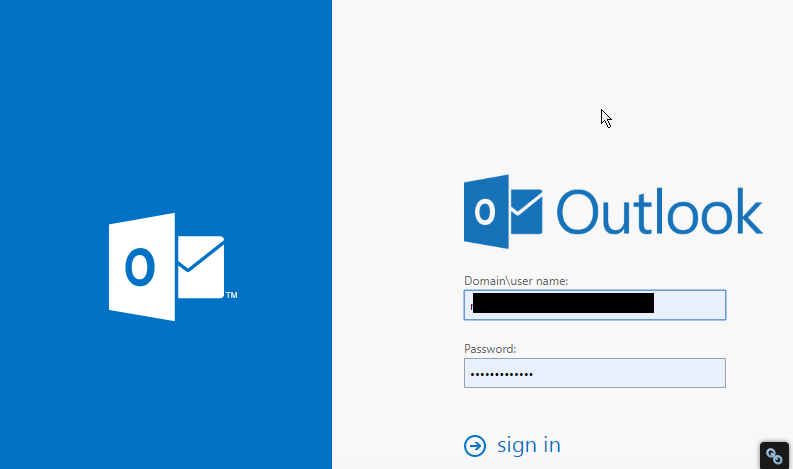
Figure 3: Outlook for Web
Follow these fixes to reconnect Outlook to mail Server:
Fix 1: Disable ‘Working Offline’
If you have accidentally switched Outlook to ‘Work Offline’ mode, follow these steps,
- Go to the ‘Send/Receive’ Tab
- If ‘Work Offline’ has a shaded background, click on it to disable

Figure 4: Work Offline Enabled

Figure 5: Work Offline Disabled
After a few seconds, the Outlook should reconnect to the mail server and you will see a change in the status bar at the bottom as ‘CONNECTED’ or ‘CONNECTED TO: [MAILSERVER NAME]’

Figure 6: Status Connected
Fix 2: Check and Install Updates
- On your Outlook, go to File>Office Account (or Account)
- Click on the ‘Update Options’ button and select ‘Update Now’ or ‘Apply Updates’
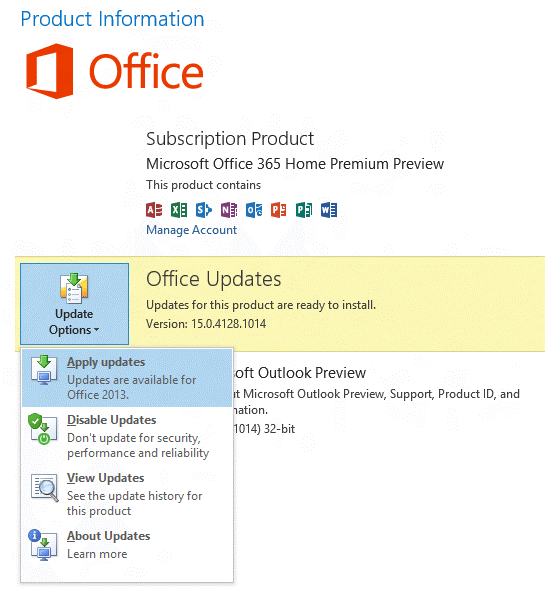
Figure 7: Update Options
If your organization is using ‘Group Policy’ to manage updates, the ‘Update Options’ button isn’t visible. Check and install the latest Windows updates to update the Outlook.

Figure 8: Update Options not available
Fix 3: Create a new profile
If your Outlook profile has a problem, the Outlook may disconnect from the server. In such a case, you can create a new Outlook profile and sign in.
- Click on File and then click ‘+Add Account’

Figure 9: Add new profile
- Then sign in using your email account
If sign-in fails with the new profile, try to reconnect your profile.
Fix 4: Reconnect Outlook Profile
Remove your mail account from the Outlook and try adding it back again. If this fails to reconnect the profile, your OST may have stopped sync from the mail server due to some error.
In such a case, you can export your Outlook mail items to an Outlook importable PST file via Outlook Import/Export wizard.
Alternatively, you may also use a third- party software such as Stellar Converter for OST to Convert OST to PST file format.
Later, you can reconfigure your Outlook profile and then import the converted PST mailbox items to your current Outlook profile.
Conclusion
If your Outlook profile is showing status as Offline or Disconnected, you should first check the ‘Send/Receive’ option and disable the ‘Work Offline’ mode. In case it’s already off, there could be a few reasons that could have led to the Outlook disconnection from the mail server.
You can follow this troubleshooting guide to check and apply various fixes that may help you reconnect your Outlook profile to the mail server. If not, export your Outlook mailbox to PST file format and then import the PST file to your new Outlook profile.
In the case of Outlook Import/Export wizard fails to export PST, you can use any reliable OST to PST converter tool as mentioned in the post. For more help, please leave your comments below.
Note:- To know the location of ScanPST.exe in different Outlook versions, read the helpful tutorial: https://www.stellarinfo.com/
Author bio

Eric Simson is an Email Platform Consultant and is associated with Stellar Data Recovery from last 6 years. He writes about the latest technology tips and provides custom solutions related to MS Outlook, MS Exchange Server, Office 365, and many other Email Clients & Servers.


2,367 Comments
Have you ever considered about adding a little bit more than just your articles?
I mean, what you say is fundamental and everything.
However think about if you added some great images or video clips to give your posts more, “pop”!
Your content is excellent but with images and video clips, this blog could undeniably be one of the greatest in its field.
Fantastic blog!
I was curious if you ever thought of changing the structure of your blog?
Its very well written; I love what youve got to say.
But maybe you could a little more in the way of content so people could connect with it better.
Youve got an awful lot of text for only having 1 or two images.
Maybe you could space it out better?
whoah this weblog is magnificent i really like reading your posts.
Keep up the great work! You know, a lot of persons are hunting around for this information, you can aid them greatly.
If you wish for to take a great deal from this article then you have to apply such
strategies to your won webpage.
You’re so cool! I do not think I have read through something like
this before. So good to find another person with genuine thoughts on this subject matter.
Seriously.. thanks for starting this up. This web
site is something that is needed on the internet, someone with a little originality!
obviously like your website but you have to
take a look at the spelling on quite a few of your posts.
A number of them are rife with spelling issues and I to find
it very troublesome to inform the truth however I will certainly come again again.
It’s perfect time to make a few plans for the long run and
it’s time to be happy. I’ve learn this submit and if I may just I
want to counsel you some attention-grabbing things
or suggestions. Maybe you can write next articles regarding this article.
I want to learn more things about it!
Genuinely no matter if someone doesn’t know then its up to
other people that they will help, so here it occurs.
I like the valuable information you provide
in your articles. I’ll bookmark your blog
and check again here regularly. I am quite sure I will learn lots
of new stuff right here! Best of luck for the next!
What’s up, just wanted to say, I enjoyed this blog post.
It was funny. Keep on posting!
Having read this I thought it was really enlightening.
I appreciate you spending some time and energy to put
this information together. I once again find myself spending way too
much time both reading and commenting. But so what, it
was still worthwhile!
Hey! This post couldn’t be written any better! Reading through this post reminds me
of my previous room mate! He always kept talking about
this. I will forward this write-up to him. Pretty sure
he will have a good read. Thank you for sharing!
I blog often and I truly appreciate your information. This great article has truly peaked my interest.
I am going to book mark your blog and keep
checking for new information about once per week.
I subscribed to your Feed too.
This piece of writing will assist the internet visitors for setting up new webpage or even a weblog from start
to end.
Afterr going over a feww off thee articles on your web page, I
honestly appreciate your way of blogging. I bookmarked it to my bookmark website
list and will be checking back soon. Plrase visit my
website ttoo and tell me how youu feel.