


If your Outlook status bar displays ‘Working Offline’ or ‘Disconnected’, it indicates that the Outlook isn’t connected to the mail server. Also, the Outlook icon on the taskbar is displayed with a ‘red cross mark’, indicating Outlook is offline.


Figure 1: Outlook Taskbar Icon indicating Outlook is Offline

When Outlook is offline, you can’t send or receive email until reconnected to the Outlook mail server.
However, you can write new emails, schedule meetings, add new tasks or notes, etc. while offline. These changes are synchronized with the mail server when the Outlook reconnects to the mail server.
In this post, we have discussed various reasons that may cause Outlook to go offline or disconnect from the mail server. Also, fixes to reconnect Outlook with the mail server and switch Outlook status from ‘Working Offline’ to ‘Connected.’
Why Outlook Went Offline or Disconnect?
Outlook may go offline due to three possible reasons,
- Internet or mail server connectivity issue
- Problem with the Outlook Account
- Accidentally enabling ‘Working Offline’ mode

Figure 2: Status Offline
Troubleshooting Methods to Fix Outlook’s ‘WORKING OFFLINE’ Status
Follow these troubleshooting steps to inspect the network connection and mail server,
- Check your internet connection and make sure your mail server isn’t blocked via the firewall. Ask your system administrator to allow access to the mail servers.
- If your Internet connection is working and the mail server isn’t blocked, there could be a problem with the mail server.
- To check the mail server, try log onto your email via Outlook for Web. Check if you can send and receive emails. If you can, then your mail server is working fine. If not, your PC might need updates or there could be a problem with your account or profile settings.
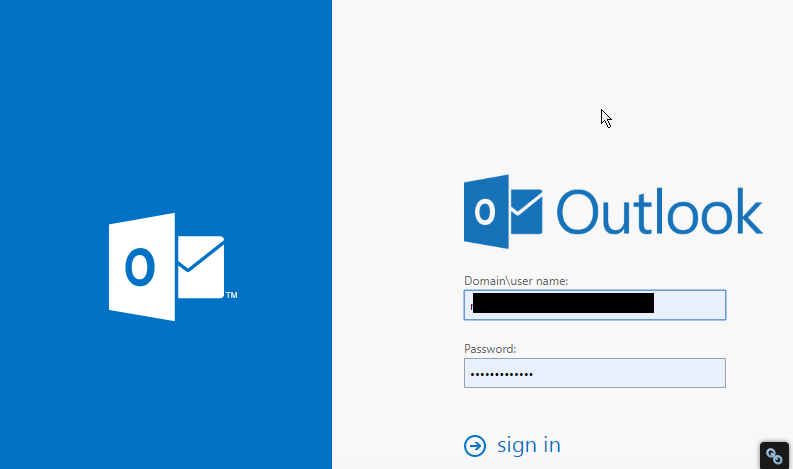
Figure 3: Outlook for Web
Follow these fixes to reconnect Outlook to mail Server:
Fix 1: Disable ‘Working Offline’
If you have accidentally switched Outlook to ‘Work Offline’ mode, follow these steps,
- Go to the ‘Send/Receive’ Tab
- If ‘Work Offline’ has a shaded background, click on it to disable

Figure 4: Work Offline Enabled

Figure 5: Work Offline Disabled
After a few seconds, the Outlook should reconnect to the mail server and you will see a change in the status bar at the bottom as ‘CONNECTED’ or ‘CONNECTED TO: [MAILSERVER NAME]’

Figure 6: Status Connected
Fix 2: Check and Install Updates
- On your Outlook, go to File>Office Account (or Account)
- Click on the ‘Update Options’ button and select ‘Update Now’ or ‘Apply Updates’
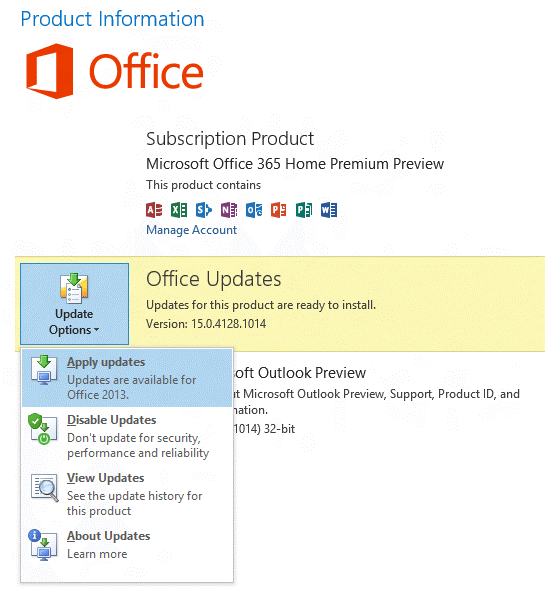
Figure 7: Update Options
If your organization is using ‘Group Policy’ to manage updates, the ‘Update Options’ button isn’t visible. Check and install the latest Windows updates to update the Outlook.

Figure 8: Update Options not available
Fix 3: Create a new profile
If your Outlook profile has a problem, the Outlook may disconnect from the server. In such a case, you can create a new Outlook profile and sign in.
- Click on File and then click ‘+Add Account’

Figure 9: Add new profile
- Then sign in using your email account
If sign-in fails with the new profile, try to reconnect your profile.
Fix 4: Reconnect Outlook Profile
Remove your mail account from the Outlook and try adding it back again. If this fails to reconnect the profile, your OST may have stopped sync from the mail server due to some error.
In such a case, you can export your Outlook mail items to an Outlook importable PST file via Outlook Import/Export wizard.
Alternatively, you may also use a third- party software such as Stellar Converter for OST to Convert OST to PST file format.
Later, you can reconfigure your Outlook profile and then import the converted PST mailbox items to your current Outlook profile.
Conclusion
If your Outlook profile is showing status as Offline or Disconnected, you should first check the ‘Send/Receive’ option and disable the ‘Work Offline’ mode. In case it’s already off, there could be a few reasons that could have led to the Outlook disconnection from the mail server.
You can follow this troubleshooting guide to check and apply various fixes that may help you reconnect your Outlook profile to the mail server. If not, export your Outlook mailbox to PST file format and then import the PST file to your new Outlook profile.
In the case of Outlook Import/Export wizard fails to export PST, you can use any reliable OST to PST converter tool as mentioned in the post. For more help, please leave your comments below.
Note:- To know the location of ScanPST.exe in different Outlook versions, read the helpful tutorial: https://www.stellarinfo.com/
Author bio

Eric Simson is an Email Platform Consultant and is associated with Stellar Data Recovery from last 6 years. He writes about the latest technology tips and provides custom solutions related to MS Outlook, MS Exchange Server, Office 365, and many other Email Clients & Servers.


2,367 Comments
With havin so much written content do you ever run into any problems
of plagorism or copyright infringement? My website has
a lot of completely unique content I’ve either created myself or outsourced
but it looks like a lot of it is popping it up all over the internet without my authorization. Do you know any
ways to help stop content from being ripped off?
I’d really appreciate it.
Oh my goodness! Impressive article dude! Thank
you, However I am experiencing problems with your RSS. I don’t know the reason why I cannot join it.
Is there anyone else having identical RSS problems? Anyone who knows the
solution can you kindly respond? Thanx!!
Thanks on your marvelous posting! I seriously enjoyed
reading it, you may be a great author. I will be sure to bookmark
your blog and will eventually come back someday.
I want to encourage that you continue your
great work, have a nice morning!
I’ve been surfing on-line more than 3 hours as of
late, but I never discovered any attention-grabbing article like yours.
It’s pretty price sufficient for me. Personally, if all website owners and bloggers made good content material as you did, the web will probably
be a lot more useful than ever before.
Hey, I think your blog might be having browser compatibility issues.
When I look at your blog site in Opera, it looks fine but when opening in Internet Explorer,
it has some overlapping. I just wanted to give you a quick heads
up! Other then that, amazing blog!
Have you ever considered about adding a little bit more than just your articles?
I mean, what you say is important and everything. Nevertheless just imagine if you added some great photos or video clips to give your posts more, “pop”!
Your content is excellent but with pics and videos,
this blog could definitely be one of the best in its niche.
Wonderful blog!
I could not refrain from commenting. Very well written!
เล่นพนันบอลให้รวย เหมือนการลงทุน เล่นง่ายได้จริง เว็บดีจริงๆ ฝาก/ถอน เร็วมาก สมัครได้ฟรี ไม่มีขั้นต่ำ คลิ๊กได้ที่นี้ที่เดียว สล็อต pg
Your mode of telling the whole thing in this post is genuinely pleasant, every one bbe capable of effortlessly know it, Thanks
a lot.
whoah this weblog is fantastic i love studying your articles.
Keep up the good work! You know, lots of individuals are searching around for this info, you
could help them greatly.
Very good site you have here but I was wondering if
you knew of any message boards that cover the same topics discussed here?
I’d really love to be a part of online community where I can get suggestions from
other knowledgeable individuals that share the
same interest. If you have any recommendations, please let me know.
Thanks a lot!
you’re truly a good webmaster. The web site loading pace is amazing.
It sort of feels that you’re doing any unique trick.
Moreover, The contents are masterwork. you have performed a magnificent task
in this subject!
I like what you guys are up too. Such clever work and exposure!
Keep up the terrific works guys I’ve incorporated you guys to my own blogroll.
Heya i’m for the first time here. I came across this
board and I find It really useful & it helped me out much.
I hope to give something back and help others like you aided me.
Do you havee a spam problem on this website; I also am a blogger, andd I was wondering your situation; we have reated some nice practices and we are
looking to exchange solutions with others, please
shoot me an e-mail if interested.