

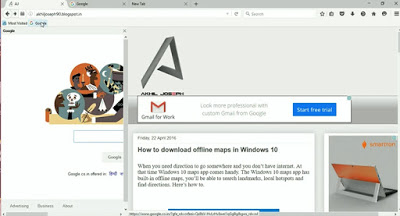
We all browse different sites to get updated or watching videos etc, today in this article I’ll show you a cool trick. Here I’m gonna show you how to open a Website in the sidebar of your browser, in this way you can browse two websites at the same time. Here’s how to.

Follow the steps
·
Open Firefox browser.
Open Firefox browser.
·
Now go to any website.
Now go to any website.
·
Now you have to bookmark.
Now you have to bookmark.
·
Right-click on the bookmark which you just created and select ‘Properties’.
Right-click on the bookmark which you just created and select ‘Properties’.
·
On this window, click ‘Load this bookmark in the sidebar’, and click ‘Save’.
On this window, click ‘Load this bookmark in the sidebar’, and click ‘Save’.
·
Now click on the bookmarks bar and open the website in the sidebar.
Now click on the bookmarks bar and open the website in the sidebar.

So guys! Browse multiple websites at the same time.
Cheers!!!


