

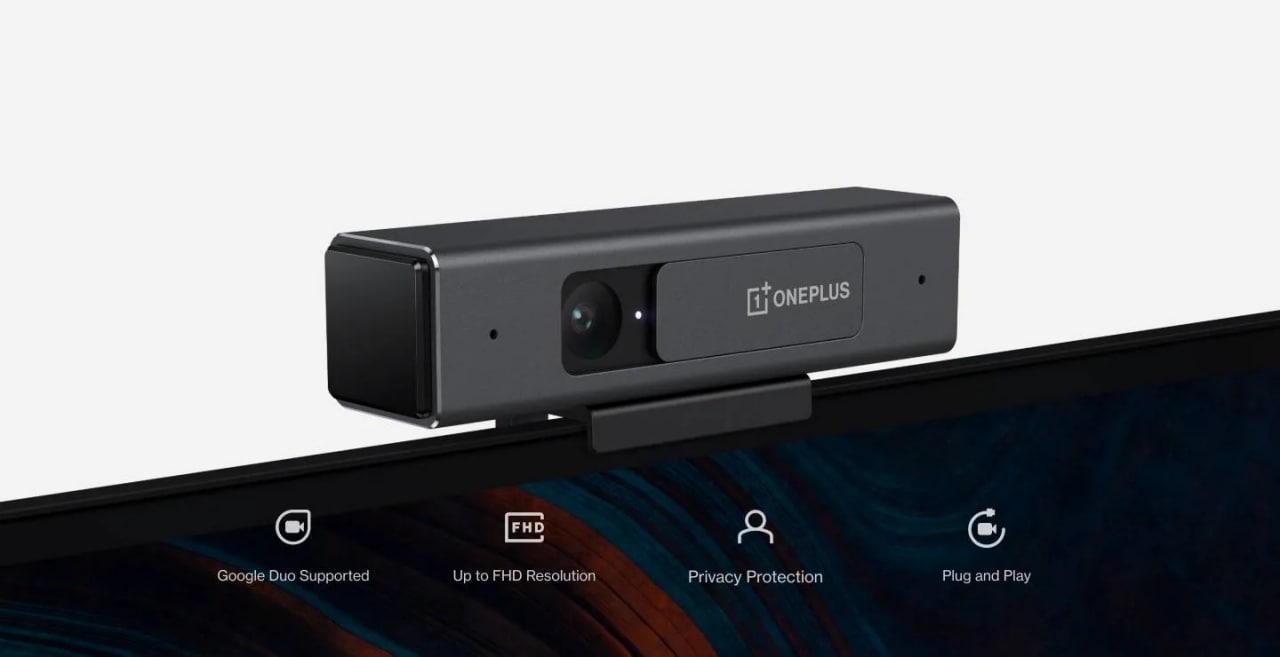
Key Points:
- The device will work with Google Duo.
- It is a plug and play device.
- The device is coming with an affordable price tag.
Alongside the OnePlus Nord CE 5G and the OnePlus TV U1S series at the brand’s Summer Launch Event, the company unveiled its first webcam called OnePlus TV Camera. It is a Plug and Play device and you need to purchase it separately. So let’s dive into the article and check out everything which you need to know about the latest product of the company.

Specifications and features of OnePlus TV Camera
The device is meant for the users who love to make video calls as it will enable you to make video calls with your near and dear ones on the big screen and it is coming with plug and play setup which means you just need to place and connect to go.
You guys can able to place the accessory on the top of the television through its magnetic holder and the device can be connected using a USB cable. The brand new camera of the company also comes with a manual shutter for privacy and that is something very useful.

The OnePlus TV Camera also features dual microphones and a noise cancellation algorithm which is meant for background noise cancellation. Moreover, it supports 1080 pixels resolution and the device can also capture photos and videos, the captured photos and videos can be shared on your smartphone via the Camera app on OnePlus TVs. It is worth mentioning that this particular application will be available on OnePlus U and Q TV series via the OTA update.
List of smart TVs with support OnePlus TV Camera
The newly announced OnePlus TV Camera is not supported on all the smart televisions of the company, as it is not compatible with the OnePlus TV Y-series. Check out the list of supported models below:
- OnePlus TV U series 55 U1
- OnePlus TV Q1 series 55Q1 Pro
- OnePlus TV Q1 series 55Q1
- OnePlus TV U series 50 U1S
- OnePlus TV U series 55 U1S
- OnePlus TV U Series 65 U1S
How to set up OnePlus TV Camera on the supported devices
The procedure of setting up the device is pretty straightforward and you guys can follow the steps below.
- First of all, you need to open the Play Store on your OnePlus TV.
- Then you need to find and install Google Duo.
- Now you need to link the application with your OnePlus TV Camera.
- After that, provide the needful permissions to the Duo application.
- Now you need to log in to your Google account and start video calling on the big screen.
Pricing and availability
It is coming with a price tag of ₹2,499 and the device can be purchased from the official OnePlus website.
Read interesting news, reviews as well as tips & tricks on TechnoBugg website, and stay updated with the latest happenings of the tech world on the go with Technobugg App. Also follow on Google News and join our Telegram channel for the latest updates.


132 Comments
The next time I read a blog, I hope that it doesnt disappoint me as much as this one. I mean, I know it was my choice to read, but I actually thought youd have something interesting to say. All I hear is a bunch of whining about something that you could fix if you werent too busy looking for attention.
I was very happy to search out this net-site.I wished to thanks for your time for this wonderful learn!! I definitely having fun with every little little bit of it and I’ve you bookmarked to check out new stuff you blog post.
Thankyou for this post, I am a big fan of this web site would like to proceed updated.
buy zithromax – what is azithromycin prescribed for buy azithromycin 100mg
Nice post. I was checking continuously this blog and I’m impressed! Extremely useful info specifically the last part 🙂 I care for such info much. I was seeking this certain info for a long time. Thank you and good luck.
This is the best weblog for anybody who wants to search out out about this topic. You realize so much its nearly laborious to argue with you (not that I really would want…HaHa). You undoubtedly put a new spin on a subject thats been written about for years. Nice stuff, simply nice!
I would like to thnkx for the efforts you have put in writing this blog. I am hoping the same high-grade blog post from you in the upcoming as well. In fact your creative writing abilities has inspired me to get my own blog now. Really the blogging is spreading its wings quickly. Your write up is a good example of it.
buy 40mg lasix online – lasix 40 mg pill buy lasix no prescription
Some truly rattling work on behalf of the owner of this web site, absolutely outstanding subject matter.
Very interesting info!Perfect just what I was searching for!
wonderful submit, very informative. I’m wondering why the opposite experts of this sector don’t understand this. You should continue your writing. I’m confident, you have a huge readers’ base already!
Just wish to say your article is as surprising. The clarity in your publish is just great and i could suppose you are an expert in this subject. Well with your permission allow me to clutch your RSS feed to stay updated with imminent post. Thank you one million and please continue the enjoyable work.
Thank you, I have just been searching for information about this topic for ages and yours is the greatest I’ve discovered till now. But, what about the conclusion? Are you sure about the source?
Hello just wanted to give you a quick heads up. The words in your post seem to be running off the screen in Opera. I’m not sure if this is a format issue or something to do with browser compatibility but I figured I’d post to let you know. The design and style look great though! Hope you get the problem fixed soon. Thanks
I really like your writing style, great information, appreciate it for posting :D. “He wrapped himself in quotations- as a beggar would enfold himself in the purple of Emperors.” by Rudyard Kipling.