


We all watch videos
on YouTube, and YouTube shows video recommendation based on our viewing
history. But sometimes your YouTube history isn’t an accurate of your taste. For
example: if any of your friend link a video of something beyond your interest,
it will keep appearing in your recommendation list. So, in this tutorial I’ll
show you How to remove video recommendation on YouTube (Android).
on YouTube, and YouTube shows video recommendation based on our viewing
history. But sometimes your YouTube history isn’t an accurate of your taste. For
example: if any of your friend link a video of something beyond your interest,
it will keep appearing in your recommendation list. So, in this tutorial I’ll
show you How to remove video recommendation on YouTube (Android).

To remove Video Recommendation from YouTube
follow the steps:
follow the steps:
·
Open
YouTube app.
Open
YouTube app.
·
Tap on
the user silhouette (top right corner).
Tap on
the user silhouette (top right corner).
·
Tap the three
dot menu.
Tap the three
dot menu.
·
Now, head
to settings > Notifications.
Now, head
to settings > Notifications.
·
Toggle the
switch next to Recommended Videos.
Toggle the
switch next to Recommended Videos.
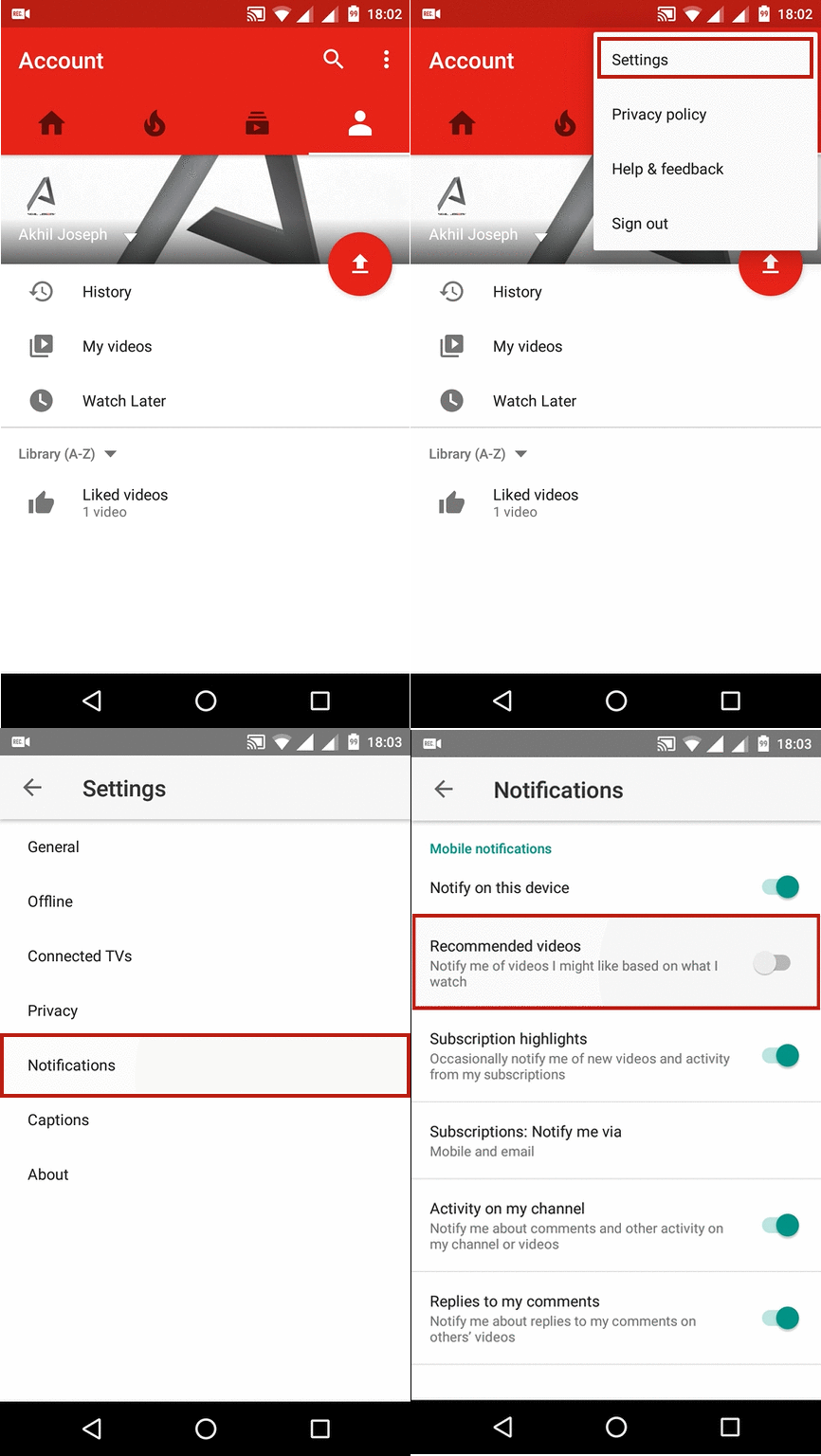
That’s it, you are now free from video
recommendations.
recommendations.
Cheers!!!


